Opsgenie is no longer sold—end of support is April 5, 2027

Upgrade from Opsgenie to
Jira Service Management(Atlassian Service Collection)

Opsgenie is approaching end of support. As an Atlassian Gold Solution Partner, Titansoft helps you migrate to Jira Service Management (Service Collection) or Compass with zero downtime.

0Service Downtime
120daysParallel-Use Period
4Steps to Migrate
Until Opsgenie end of support days
June 4, 2025 End of sale: no new purchases, version changes, or new sites
April 5, 2027 End of support: no login, and unmigrated data will be deleted
Start your assessment now to make the most of the remaining migration window

Opsgenie’s next chapter starts now

Since 2018, Atlassian has been steadily integrating Opsgenie’s capabilities into its platform and products to help Dev and IT teams collaborate more smoothly. Today you have two clear migration paths.

🔔

Why migrate now?

After Opsgenie reaches end of support, you won’t be able to log in, and all unmigrated data will be deleted. The sooner you start, the more comfortably you can complete validation, training and cost planning—avoiding operational disruption and data loss.

See the key timeline →
⏱️

Virtually zero downtime

Most migrations take only minutes. Opsgenie and JSM / Compass share the same backend architecture, so the process doesn’t affect notification delivery or day-to-day operations.

🤝

Full partner support

As an Atlassian Gold Solution Partner, Titansoft helps you evaluate options, plan the timeline, handle edge cases and manage cost transitions.

Launched October 7, 2025

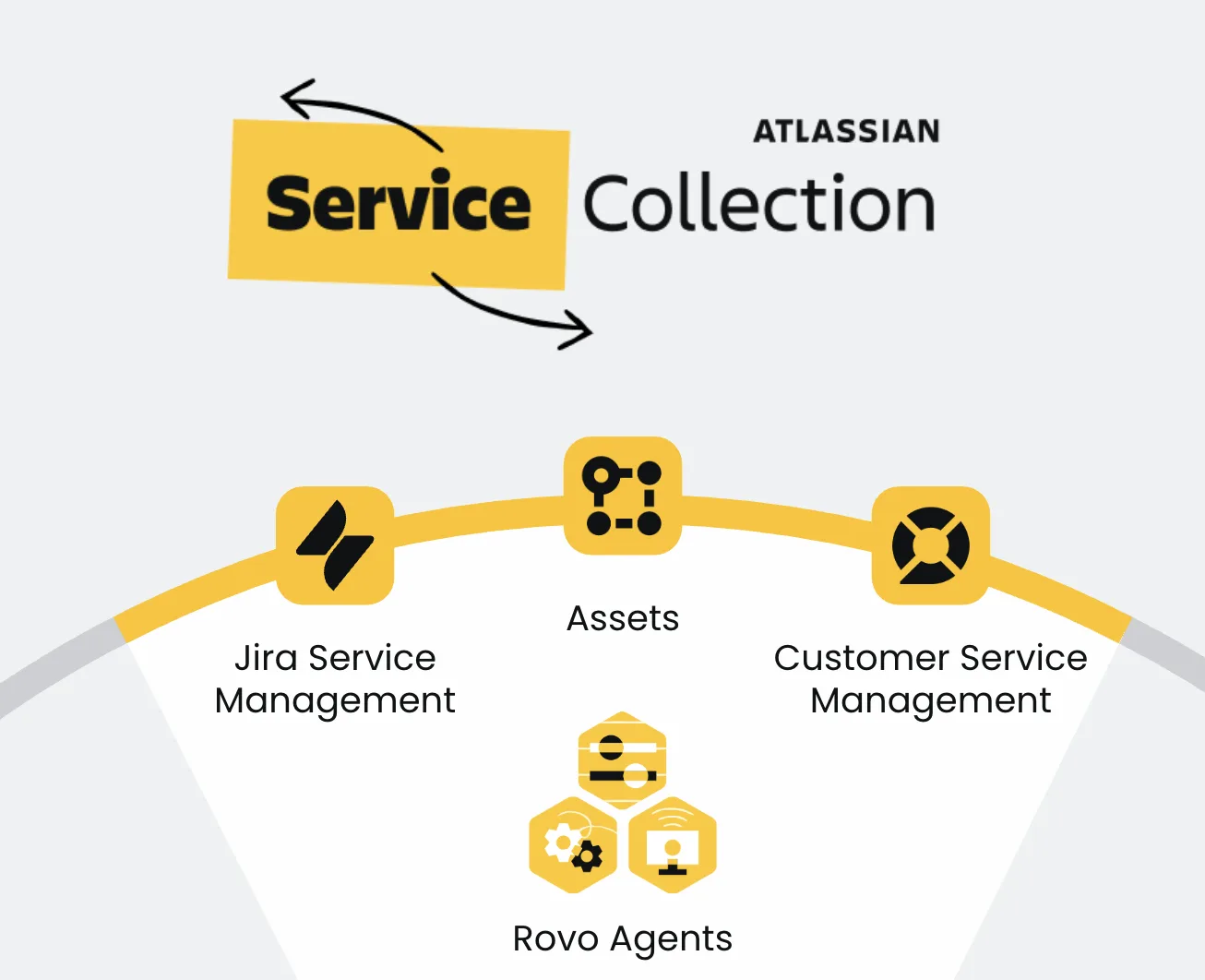
Meet Atlassian Service Collection

Atlassian brings Jira Service Management, Customer Service Management, Assets and Rovo Agents together into a single, AI-powered service management solution. The Jira Service Management you migrate Opsgenie to is the very core of Service Collection.

Atlassian Service Collection: bringing together Jira Service Management, Assets, Customer Service Management and Rovo Agents
Opsgenie migration target

Jira Service Management

Core service management that connects Dev, IT and business teams, improving the employee experience and service resilience.

Customer Service Management

A brand-new customer-facing service app that strengthens external customer support with AI and closes the feedback loop between the front line and the business.

Assets

A flexible asset database to track, manage and visualize critical assets and services, and map their dependencies.

Rovo Agents

AI teammates that help triage and deflect requests, resolve incidents and generate knowledge.

These apps are sold together as an integrated collection (not individually). They share service management technology such as queues, SLAs, forms and reports, and are built on the Atlassian platform (Rovo, Teamwork Graph, Automation, Analytics, Security).

Jira Service Management

Service for “inside the organization” (ITSM)

For
Internal IT operations and support teams
Users
Employees
Capabilities
Request, incident, change, problem, asset and configuration management
Access
Internal to the organization only

Customer Service Management

Service for “external customers” (CSM)

For
Customer service teams
Users
External customers
Capabilities
Customer context, customer-service AI Agent, CRM integration
Access
Publicly accessible

Both share the same service management technology and are likewise built on the Atlassian platform.

Choose the right target platform for your team

As the Opsgenie Owner, go to Settings > Migrate Opsgenie, and the system will recommend the migration path that best fits your usage.

Option 1 · Recommended

Alerts + On-call + Incidents + an end-to-end ITSM solution

  • Keep the incident management essentials your team relies on every day, all in a single platform
  • A 99.9% availability SLA and regional support for dependable reliability
  • AIOps and AI-powered ITSM capabilities
  • Add it to your existing plan to avoid extra subscription costs
Best for: teams that need full IT service management (incident / change / problem)
Option 2

Alerts + On-call + a comprehensive internal developer platform

  • Provides alerting and on-call scheduling
  • An internal platform centered on developer experience
  • Ideal for engineering teams organized around a software service catalog
  • Lightweight and focused on DevOps workflows
Best for: developer-centric engineering teams that don’t need full ITSM

Key feature comparison

All offer alerting and on-call, but they differ markedly in incident, change and problem management as well as AI capabilities.

Feature category Opsgenie Jira Service Management Compass
Alerting & on-call
Incident management
Change management
Problem management
AIOps
AI-powered ITSM

For the full feature differences, see the official Atlassian docs: Feature changes and deprecations in JSMWhat to expect from Opsgenie migration

Complete ITIL / ITSM practices

What problems can JSM solve for you?

Jira Service Management doesn’t just inherit Opsgenie’s alerting and on-call—it brings the full set of ITIL/ITSM practices together on one platform. Below are the customer pain points each service management practice addresses, along with how JSM solves them.

🎫

Service Request Management

Request Management

Requests scattered across email and DMs, repetitive small requests flooding IT, and employees unable to check their own status.

  • A single intake point centralizes all requests, auto-routing them into Queues
  • Forms and request types capture request details in a structured way
  • SLAs automatically track deadlines and proactively warn before they’re missed
🚨

Incident Management

Incident Management

Alerts scattered across monitoring tools, no clarity on “who’s responsible right now,” and every incident feeling like starting from scratch.

  • Integrate 200+ monitoring and application services to centralize and sync alerts
  • Spin up a war room for major incidents in one click, with Slack / Teams collaboration
  • A complete incident timeline, with AI helping draft the post-incident review (PIR)
Fully inherits Opsgenie
📟

Alerting & On-call Scheduling

Alerting & On-call

Alert noise drowning out important signals, on-call rotations built by hand in Excel, and no automatic escalation when the first responder doesn’t answer.

  • Alert deduplication and grouping to cut noise while keeping the meaningful signals
  • On-call scheduling supports multi-time-zone rotations and cover for time off
  • Escalation policies automatically escalate when there’s no response
🔍

Problem Management

Problem Management

The same kinds of incidents recurring, constant firefighting, and preventable incidents slipping through for lack of tracking.

  • Group multiple incidents under a single problem and start root cause analysis
  • “Known errors” plus temporary workarounds dramatically cut downtime when they recur
  • Proactive problem detection prepares a response before incidents happen
🔀

Change Management

Change Management

Lengthy approval processes slowing delivery, change risk hard to assess up front, and information gaps between development and operations.

  • Standard / normal / emergency change tiers route by risk through different workflows
  • A change calendar prevents collisions and automatically calculates risk levels
  • Integrate CI/CD (Bitbucket, Jenkins…) to automatically build an audit trail
📚

Knowledge Management

Knowledge Management

The same questions asked a dozen times a day, docs outdated and scattered, and critical knowledge stuck in a few people’s heads.

  • A built-in knowledge base powered by Confluence
  • AI auto-generates draft knowledge articles from common tickets
  • Self-service deflection surfaces relevant articles automatically as users fill out forms
🗂️

Asset & Configuration Management

Assets & CMDB

Assets scattered across spreadsheets, inventories that never reconcile, and no idea which systems are affected when an incident hits.

  • A flexible asset database centrally manages every configuration item (CI)
  • Visualized dependencies speed up incident troubleshooting and reduce change risk
  • Automatically discover network assets and keep them updated from Jira tickets
🤖

AI Service Management

Rovo & Virtual Agent

The front line swamped by repetitive requests, lengthy ticket handoffs eating up time, and no one to respond in real time after hours or on weekends.

  • A virtual service agent handles common requests like password resets 24/7
  • AI summarizes tickets and incident timelines so you grasp the context fast
  • Rovo Agents run processes like employee onboarding end to end

JSM’s incidents, alerting, on-call and incident swarming are all powered by Opsgenie, and included across every cloud plan—migrate from Opsgenie and you won’t lose a single one of these core capabilities.

By industry

How do different industries use JSM?

Choose your industry to see the relevant “applicable products” and real-world “use cases” for JSM. Content compiled from Atlassian’s official industry pages.

Jira Service Management feature highlights

Representative features you’ll be able to use after migrating, spanning IT operations, customer service, developer collaboration and the employee experience. Below are actual Atlassian product screens.

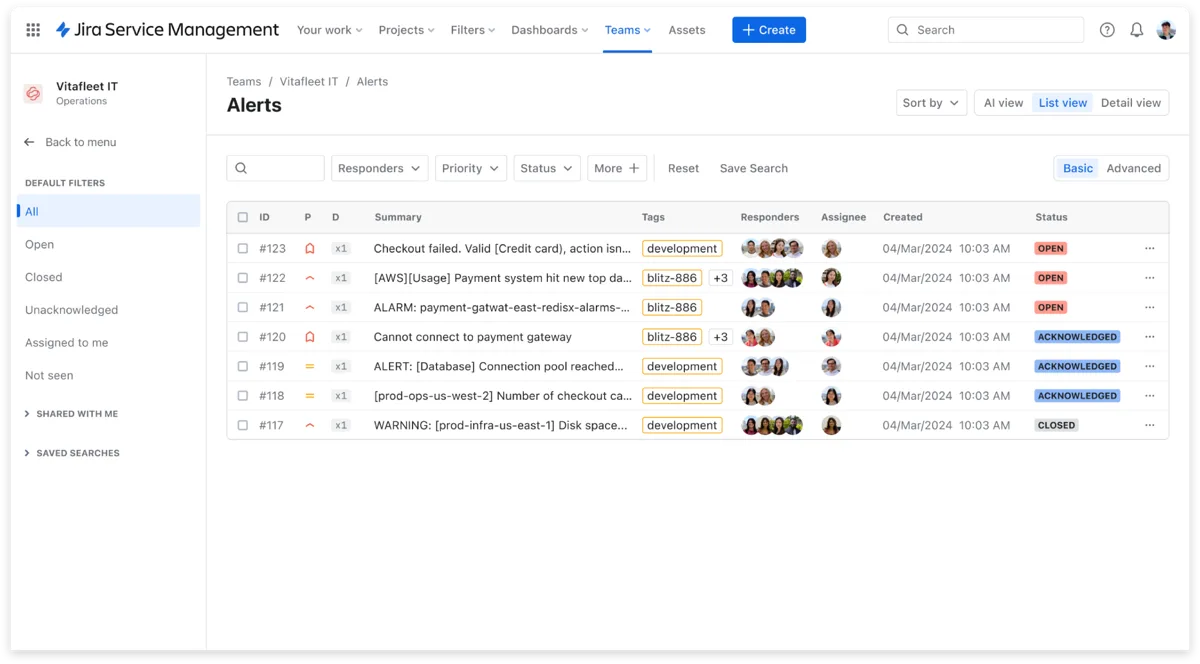
Jira Service Management alert list screen
IT Operations

Centralized alert management

View, assign and handle alerts directly within JSM, without switching to a separate tool.

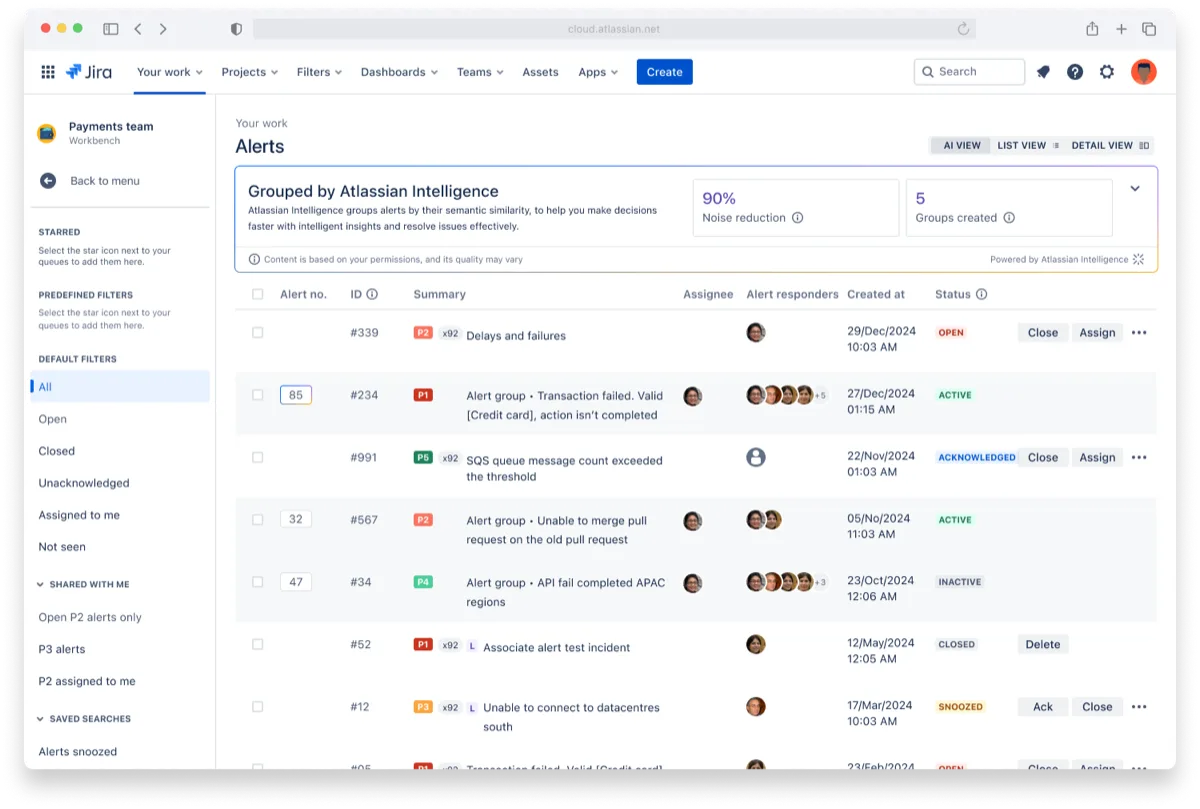
Atlassian Intelligence automatic alert grouping screen
AI · IT Operations

AI alert grouping

Atlassian Intelligence automatically groups similar alerts, reducing noise and prioritizing the response.

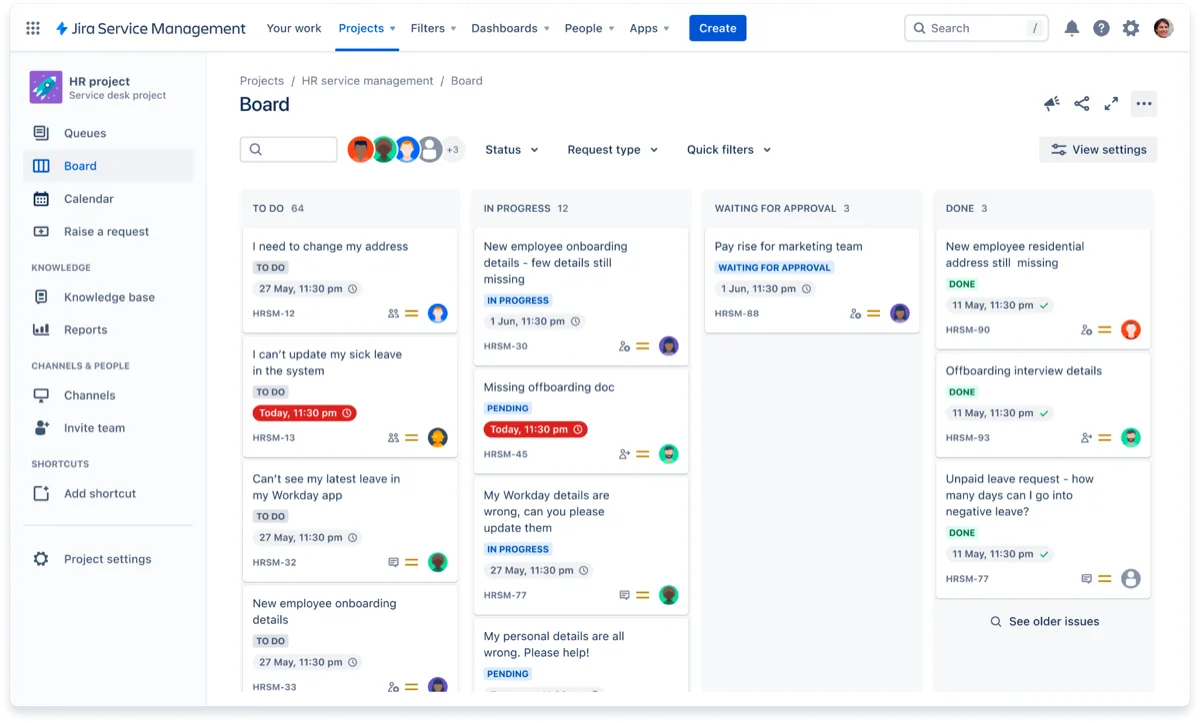
JSM viewing service requests as a board
Customer Service

Multiple request views

Organize requests with Queues, Board or Calendar views to keep tabs on dependencies and timelines.

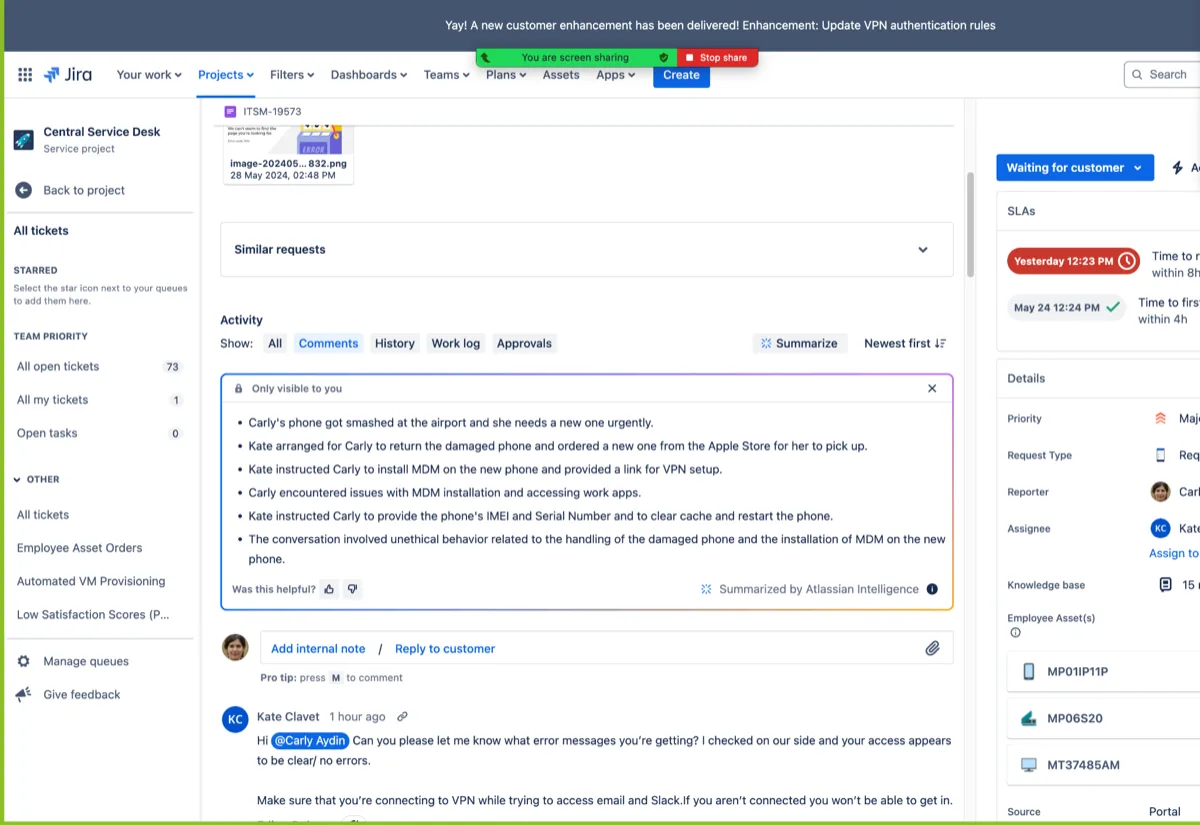
AI summary inside a JSM ticket
AI · Customer Service

AI ticket summaries

Condense long conversations into key takeaways in one click, helping agents get up to speed and respond faster.

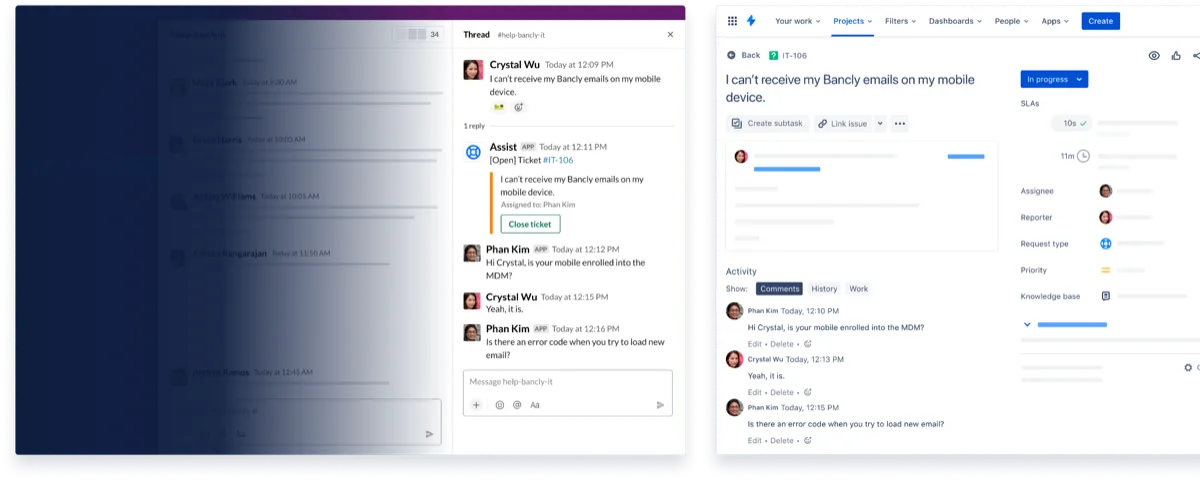
Creating tickets conversationally from Slack / Teams
Customer Service

Conversational ticketing

Deflect common requests right from Slack or Microsoft Teams, automatically creating and assigning tickets.

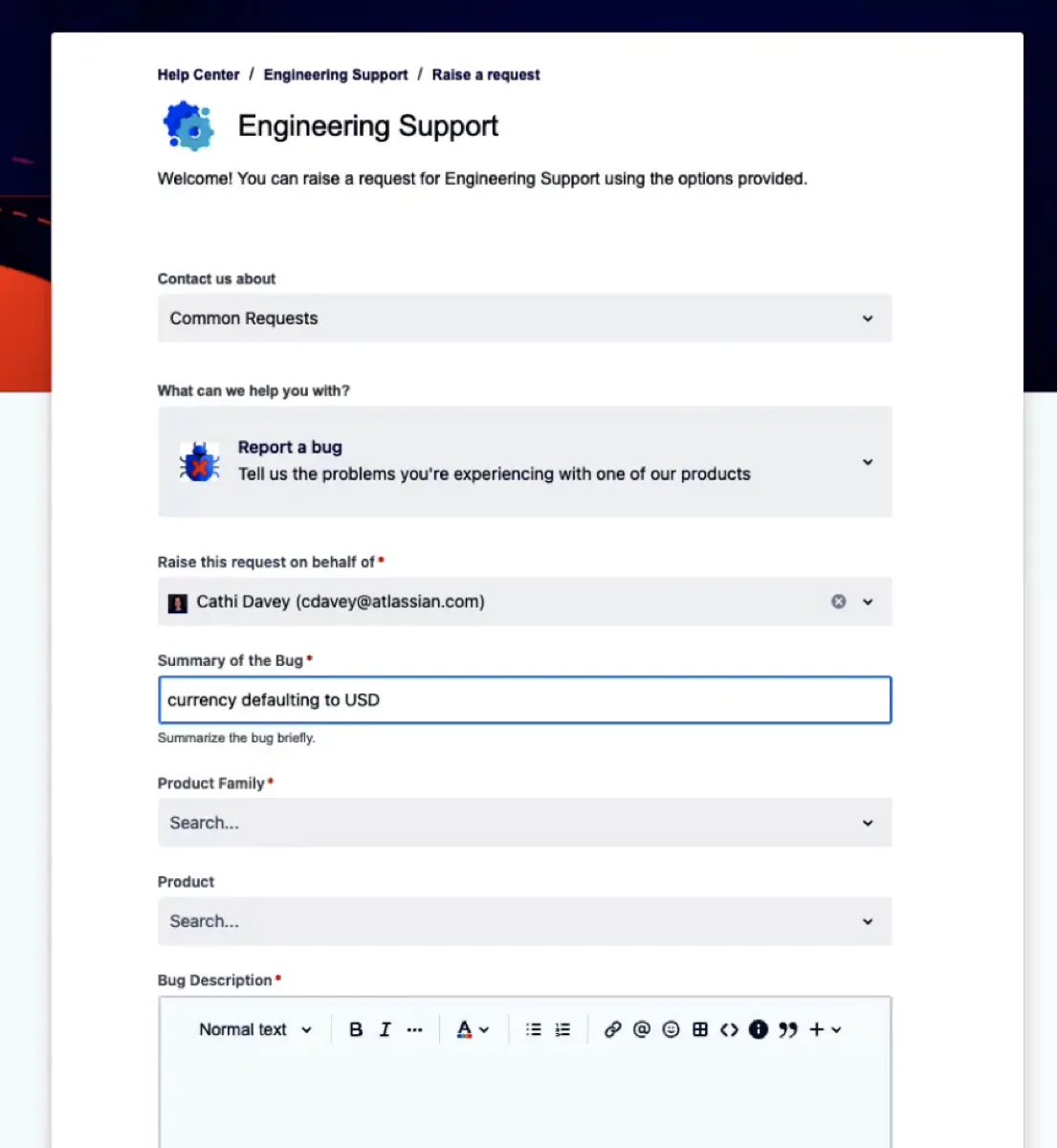
JSM self-service request portal
Developer · Self-service

Self-service portal

Prebuilt forms and a Help Center let users submit bug reports and service requests on their own.

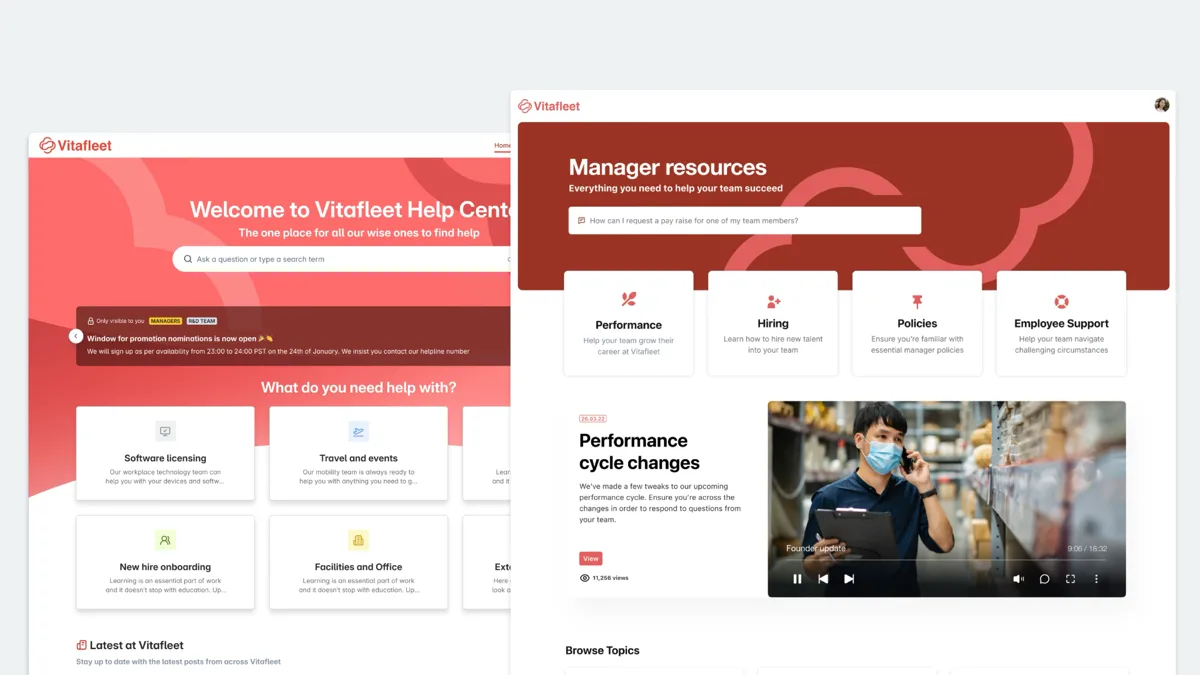
Branded employee Help Center
Employee Experience

Personalized Help Center

Build a branded, personalized employee service center for teams like HR and facilities, boosting self-service rates.

Standard · Premium · Enterprise

Choose the JSM edition that fits you

From Standard to Enterprise, scale up to meet your governance, compliance and support needs. Upgrade to Premium for 24/7 support, an SLA guarantee, and advanced ITSM / AIOps capabilities.

24/7 critical-issue support
Enhanced security protection
99.9% uptime SLA

👆 Click a column header (Standard / Premium / Enterprise) to switch the highlighted edition

Feature Standard
Standard
Premium Recommended Enterprise
Customer supportRegional business hours24/7 (critical issues <1 hour response)24/7 + a dedicated senior support team
Uptime SLA99.9%99.95%
Storage250 GBUnlimitedUnlimited
Major incidents / month100UnlimitedUnlimited
Post-incident reviews (PIR)5UnlimitedUnlimited
Incident creation methodsManual onlyManual / automatic / API / templateManual / automatic / API / template
Alert voice notifications
Advanced change management (CI/CD deployment gating)
Problem management queues
AIOps (alert grouping / similarity detection)
AI incident creation / AI PIR / Slack timeline
Automation rule limit1,000 / agent1,000 / agentUnlimited
Data residency
Release tracks
Sandbox
IP allowlist
SSO / SCIM / AD syncRequires Atlassian Guard add-onRequires Atlassian Guard add-onIncluded

Data compiled from Atlassian’s official Jira Service Management Premium page (including Admin controls); some figures are based on the official plan comparison table, with the Atlassian website’s announcements taking precedence.

Work on the go

Take ITSM with you

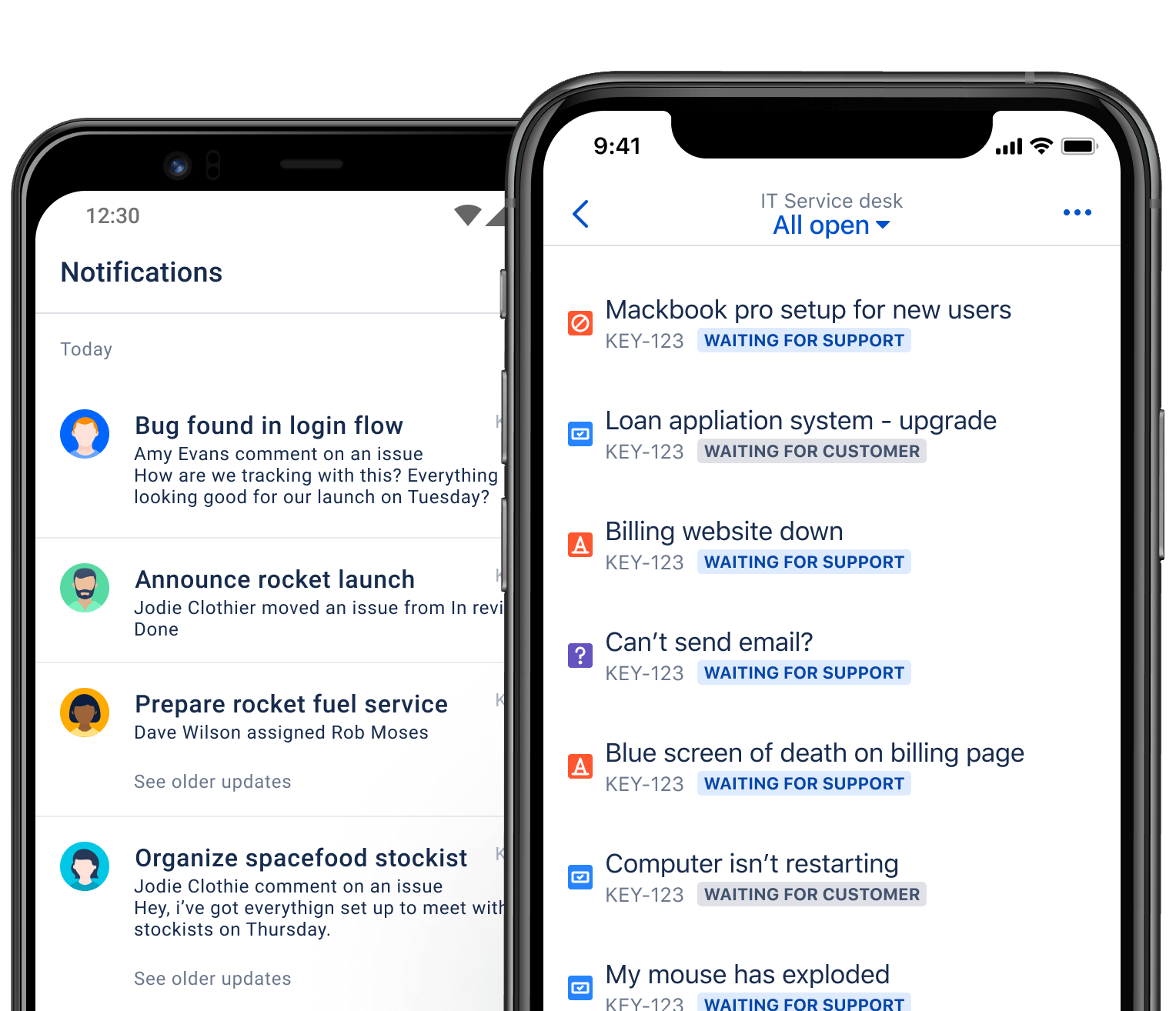
With the Jira Service Management mobile app, you can submit, approve and resolve tickets in real time wherever you are—so service never stops just because you’ve left your desk.

  • Submit and update requests and reply to customers anytime
  • Managers approve changes and requests in one tap
  • Receive alert push notifications and handle incidents the moment they happen
Jira Service Management mobile app: notification center and IT service desk ticket list screens

Four steps to complete your Opsgenie migration

Your data is “copied” to the target platform while your existing Opsgenie stays as is, so both sites can run in parallel and you can validate with confidence.

  1. 01

    Choose a new plan

    • Opsgenie’s built-in migration assistant recommends a suitable JSM plan based on your current usage
    • Confirm the target product
    • Schedule a migration date
  2. 02

    Prepare for migration

    • Submit the migration date for billing admin approval
    • Prepare your team for the transition in the meantime
    • Notify the relevant people about account / permission changes
  3. 03

    Data moves automatically

    • Atlassian automatically moves your data and configuration on the chosen date
    • No downtime during the process
    • You can keep using Opsgenie, unaffected
  4. 04

    Complete the migration

    • Atlassian provides in-product guidance to finish the final setup in JSM
    • Confirm alerting / on-call workflows are working
    • Officially shut down Opsgenie once validated
120days

Run Opsgenie and JSM in parallel for up to 120 days after migrating

Use it to verify that everything is configured correctly, let your team gradually adapt to the new system, and only officially shut down Opsgenie once you’ve confirmed alerting / on-call workflows are working.

Moved by automated tooling (handled by Atlassian)

Teams and on-call schedulesEscalation policiesAlert routing rules Notification policiesIntegrations

Requires customer confirmation and effort

Designate a billing admin to approve the migration dateVerify external connections like Integrations / Webhooks Run UAT within 120 daysNotify the team about account / permission changes

Two dates you absolutely can’t miss

The earlier you plan, the more room you have to complete validation, testing and user training.

June 4, 2025

End of sale

  • No new purchases, upgrades, downgrades or adding sites
  • After this date, only renewals and adding user seats are allowed
  • Make any near-term edition and site adjustments you need first
April 5, 2027

End of support

  • Opsgenie can no longer be logged into or used
  • All unmigrated data will be deleted
  • Be sure to complete your migration and download any needed data before this date

Until Opsgenie end of support (April 5, 2027):

days

Not sure where to start?

Let Titansoft help you assess your current state, plan the timeline and complete your migration with confidence.

Contact Us

Frequently asked questions

Ready to start your Opsgenie migration?

Titansoft is an Atlassian Gold Solution Partner offering migration assessment, solution planning, cost transition and technical support. Get in touch and we’ll tailor a migration path for you.

  • Migration assessment and path recommendations
  • Timeline planning and parallel-validation support
  • Handling special cases (cross-organization / Data Center)
  • Cost and contract transition consulting